SIP CallerSIP Caller

Discover the unparalleled features provided by SIP Caller

Use your own Phone System

You love your phone system but it lacks good capabilities for outbound calling campaigns? No worries, SIP Caller comes to the rescue! We connect to your phone system as a remote extension, so you can leverage your existing infrastructure. Outbound calls will be generated using your existing phone lines, so your customers will see your number as the caller.
In addition, there is no software to install, as we connect to your phone system from the cloud using standard SIP & RTP protocols over a secure TLS connection.
Make up to 256 simultaneous calls, and connect to different Phone Systems, to easily handle multi-branch companies.
Use your own Phone System
Voicemail Detection

Voicemail Detection

We automatically detect whether a call has been answered by a human or an answering machine, using real time speech analysis, and trigger a different call flow for each case, for example transferring human-answered calls to your agents while leaving a message on voicemail.
Choose Standard Voicemail Detection, fast and free of AI cost, or AI-Based Voicemail Detection for maximum accuracy. AI-Based Voicemail Detection understands what is actually being said, separately identifying humans, voicemail, and company IVRs, and can even bypass automated call screeners.

Standard Voicemail Detection: fast, algorithm-based, no AI cost

AI-Based Voicemail Detection: higher accuracy, understands speech

AI-Based Voicemail Detection bypasses automated call screeners automatically

AI Conversational Agents

Let AI conduct your outbound calls with natural, goal-driven conversations. Give your agent a persona, a purpose, and the context for each call, and it handles the conversation from greeting to outcome, no scripts to record, no flows to design.
Every call is personalized using your campaign data, and the contact can ask to be transferred to a human agent at any point, with the full conversation context passed along automatically.

Create and configure your agent directly from the SIP Caller console

Personalized conversations using variable customer data

Define a goal for each call, and get a structured outcome back

Seamless, context-aware transfer to a human agent at any time

Powered by Microsoft Azure OpenAI Service and Google Gemini

AI Conversational Agents
Easily define your call flows

Easily define your call flows

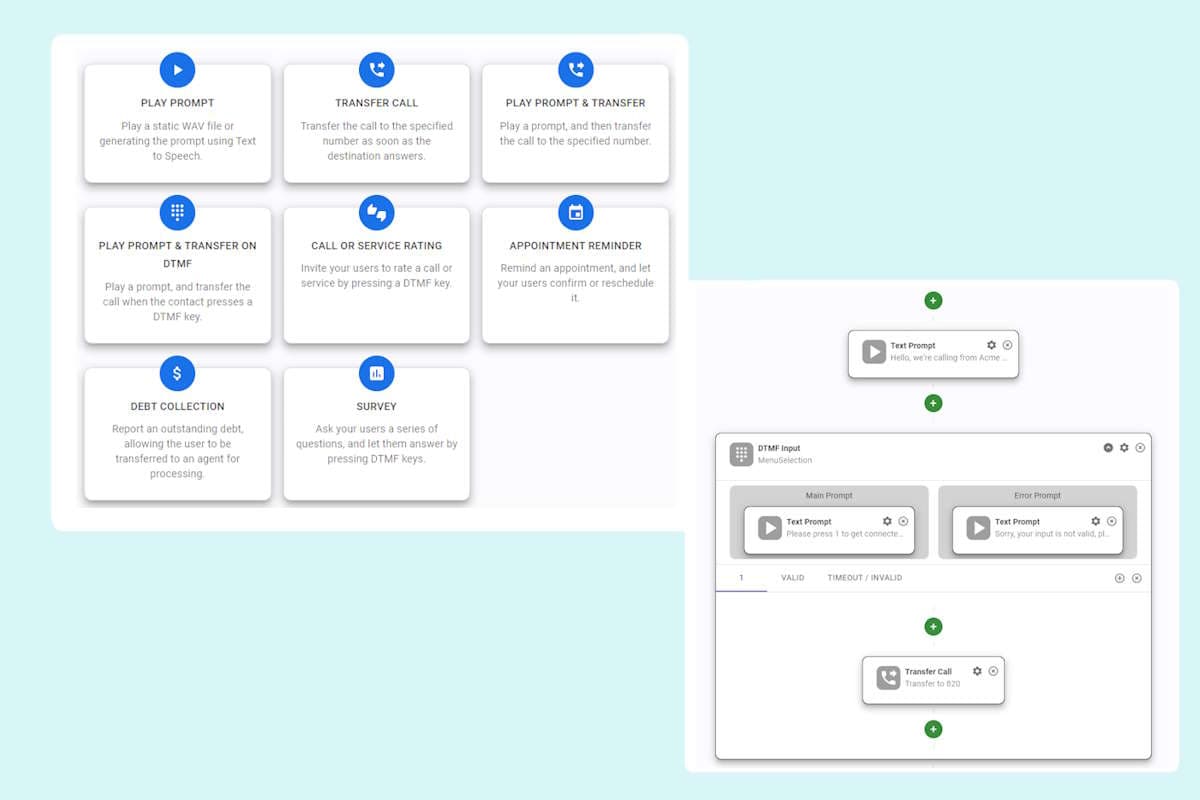
Defining call flows has never been easier. We provide templates for the most common use cases, which you can use from a step by step wizard, so you can create them in minutes! No complex interfaces with hundreds of options that you don’t know how to fill. Just enter the text to play, or the extension number to which SIP Caller must transfer the calls. As simple as that!
Your call flow is not covered by the templates? No worries, we provide a visual designer, which lets you configure any call flow. You can start from scratch, or edit with the designer a call flow created from a template.

Campaign creation simplified!

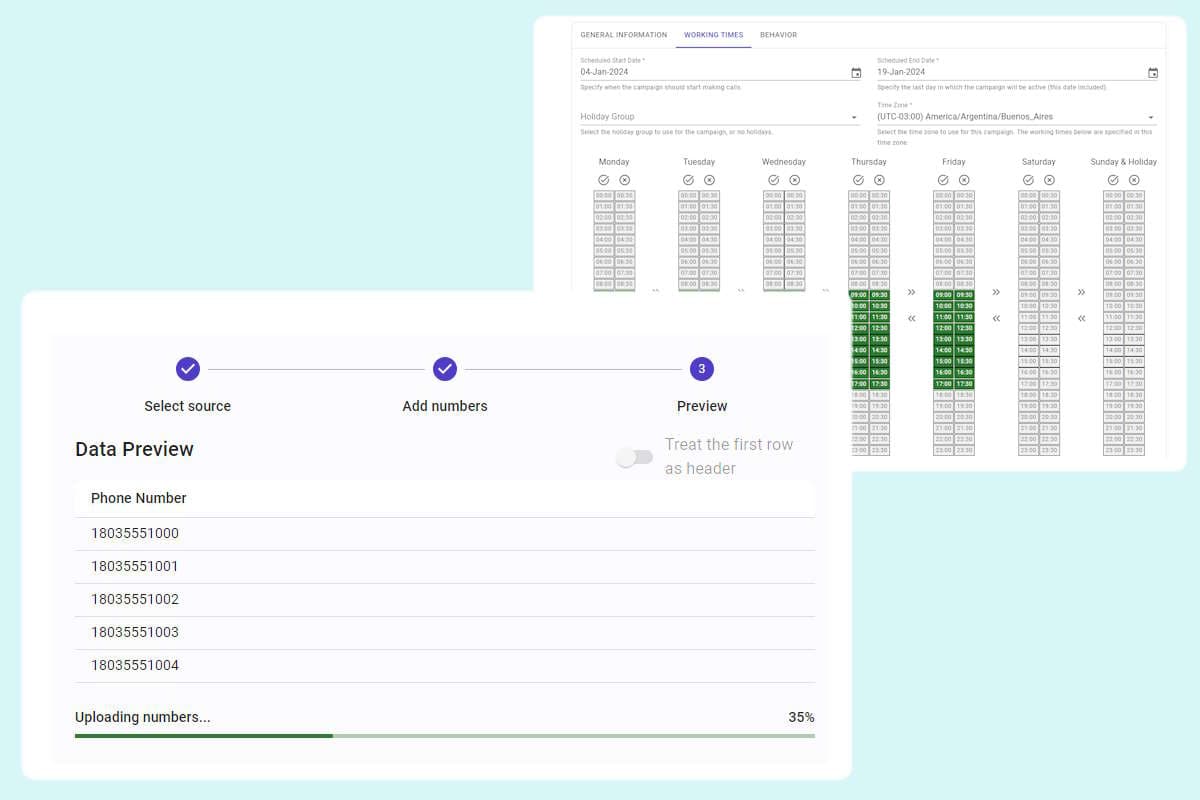
Once you have configured the link to your phone system and defined the call flows you want to use, creating a campaign becomes a walk in the park:

Select the extension you want to use from your phone system.

Choose between Predictive, Progressive and Power Dialer modes.

Define the operation dates & times, and holidays. SIP Caller will only make calls during the active campaign time frames.

Specify the maximum number of attempts to try to call each number, the time to wait before retrying in case of failure, the time to wait for the call to be answered, and the call flow to use when a human answers the call, or when an answering machine does.

Select the black lists to apply to the campaign, and upload the numbers to call from a CSV file. Each number can optionally be accompanied by variables associated with the contact.

Campaign creation simplified!
Text to Speech or WAV files

Text to Speech or WAV files

Play pre-recorded messages from WAV files, or generate them automatically using Text to Speech. We use Google Cloud Text to Speech to automatically generate the audio for your messages, using the voice of your choice.
Play a different message on each call, by using variable parts. For example, include a due balance, an expiration date, or any other customer related information.
Configure your prompts as plain text for simplicity, or use advanced SSML techniques to allow for more customization in the generated audio, by providing details on pauses, and audio formatting for acronyms, dates, times, abbreviations, or text that should be censored.

Collect DTMF Input & Transfer

Interact with your customers automatically, and let them select menu options, or provide any feedback using DTMF keys. The information entered by the user will be included in the call detailed report, so you can inject this information into your CRM.
Transfer the call to your agents at the point of the call flow you decide. For example, let users select an option to be transferred to your sales team, so you only send them calls connected to users who are willing to buy your product.
Collect DTMF Input & Transfer
Real time & historical reports

Real time & historical reports

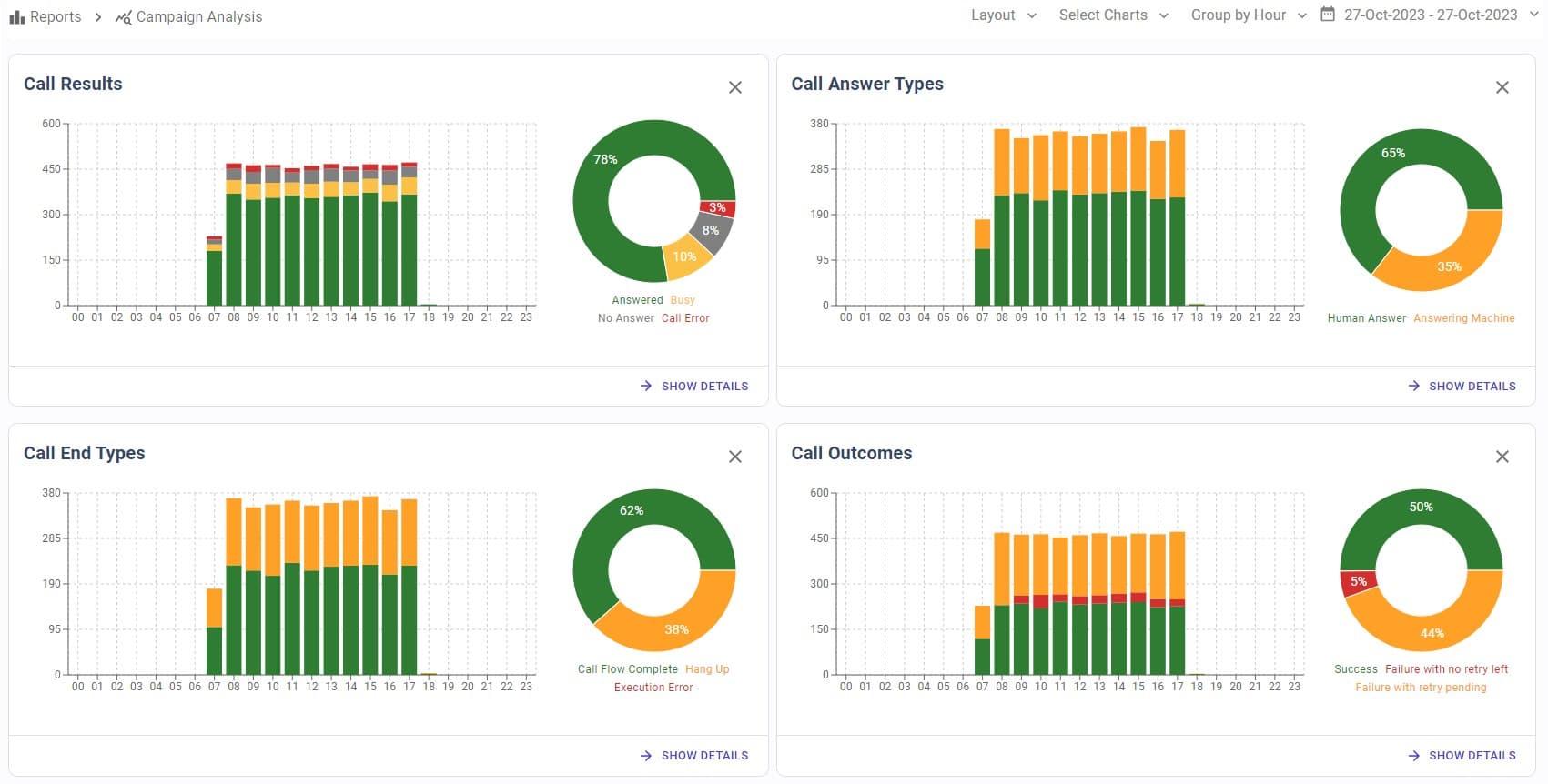
Check your campaign progress in real time. Our dashboard will tell you the number of successful, failed, and pending calls, among other very useful metrics.
Obtain a call by call detailed report, including the date and time, the call result (answered, busy, no answer, error), the user input (when any), and the SIP status code and description.
Get insightful performance graphics for a better understanding of your campaign progress.

Get notifications about the events that matter to you

Never miss what’s happening with SIP Caller. Get immediate email notificationss for the topics you need, including:

Account logins

Users creation

Phone system connection alerts

Call flows changes

Campaign changes

Billing issues

Get notifications about the events that matter to you
Add collaborators to your account

Add collaborators to your account

A single user is not enough when your organization grows. You need different users, with different permissions, so each member can handle exactly what they need!
With SIP Caller you can create as many users as you need, all included in your plan! And you can also use Tags to restrict some campaigns to specific users. For example, you could have campaigns from 2 different departments in your company, with different employees handling them.
The following roles are available:

Administrator: full permissions everywhere

Account Reader: read permissions everywhere

Operations Manager: full permissions for phone systems, call flows and campaigns

Operations Reader: read permissions for phone systems, call flows and campaigns

Reports Reader: access to all reports

Connect to any external system with the REST API

The SIP Caller REST API lets you integrate your existing platforms — CRM, ERP, database, or any custom application — directly into your calling workflows. The most powerful use case is dynamic number injection: your system queries the contacts it needs to call and pushes them into a live campaign via API, keeping every campaign in sync with your data source in real time.
The API uses standard HTTP and JSON, making it straightforward to integrate from any programming language or environment. Full documentation is available in the API documentation section.

Add contacts to a running campaign from any external system

Trigger campaign actions based on events in your CRM or ERP

Standard HTTP/JSON — easy to integrate in any tech stack

Full API documentation available in the docs section

Connect to any external system with the REST API
Stay in sync with Webhooks

Stay in sync with Webhooks

While the REST API lets you push data into SIP Caller, webhooks do the opposite: SIP Caller automatically pushes call result data out to your systems the moment an event occurs. No polling required — your CRM, billing platform, or workflow engine is notified the instant a call finishes.
Configure a webhook URL in SIP Caller and choose which events to subscribe to. For each event, SIP Caller sends an HTTP POST with a structured JSON payload. Failed deliveries are automatically retried with exponential back-off, and a full delivery log is available in the console so you can inspect and replay any failed notification.

Instant call result notifications — no polling required

Structured JSON payload for easy parsing in any system

Automatic retries with exponential back-off on failure

Full delivery log with inspect and replay in the console

* All trademarks mentioned are not affiliated with Easy Caller LLC, its products, or its websites. The owners of these trademarks are not the source of, and do not sponsor or endorse, the products/services promoted here. All product and company names are trademarks™ or registered® trademarks of their respective holders. Use of them does not imply any affiliation with or endorsement by them.


SIP Caller
© 2026 Easy Caller LLC All Rights Reserved
LinkedinYou Tube
Trustpilot