
Fewer Dropped Calls
Because the agent is already on the line, customers never experience dead air, leading to higher connection success and better engagement.
Enrich your 3CX Phone System by enabling Progressive Dialer functionality. Ensure agents are always on the line, deliver a better customer experience, and give your team time to prepare for every call.
01
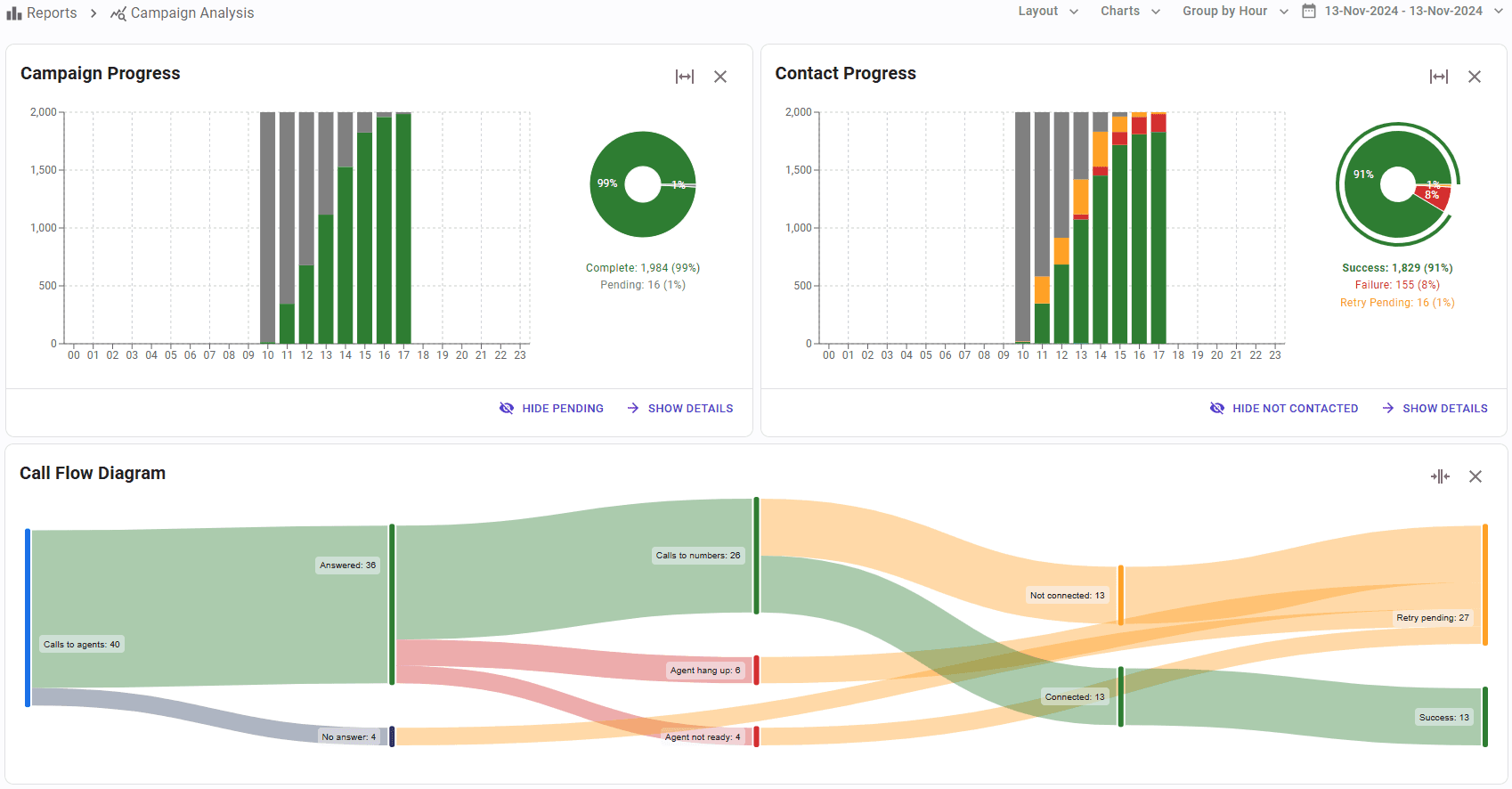
The Progressive Dialer is built for calls with agents, where the agent is called first. SIP Caller only dials a customer once a free agent has answered, so every customer is greeted right away by someone ready to talk: no waiting and no dead air.
SIP Caller calls an agent
A free agent in the queue answers and gets ready
Customer is dialed
The agent hears the call ringing, just like a manual call
Instant conversation
The agent is already on the line, so the customer never waits
Dials as many contacts as your plan allows and runs an automated call flow when they answer. No agents involved.
Called first
Customer
Agents
Not needed
Best for
Announcements, reminders, surveys
Dials customers ahead of time based on free agents and answer rates, and transfers each answered call to an available agent.
Called first
Customer
Agents
Required
Best for
Sales, collections, high volume
Calls a free agent first, and only dials the customer once the agent has answered and is ready to talk.
Called first
Agent
Agents
Required
Best for
Sensitive, high-value calls
02
Cloud based, complete and integrated platform, ready to use
User friendly interface, easier than ever
Deliver a more personal and seamless customer experience
Avoid dropped calls and awkward delays
Forget about CFD dialers limitations, enjoy the power of SIP Caller
+78%
Calls Handled by Agents
-47%
Call Drops
+45%
Total Calls Made
03
+82%
Talking Time
+79%
Meaningful Contacts
+120%
Conversion Rate
-65%
Agent Idleness
* Data obtained from our user base who used SIP Caller Progressive Dialer during 2025
04
Because the agent is already on the line, customers never experience dead air, leading to higher connection success and better engagement.
Connect the agent before dialing the customer, ensuring a smooth experience and giving agents time to prepare.
Perfect for sensitive, high-stakes, or relationship-driven conversations where agent readiness and a smooth call experience make all the difference.
From live dashboards to insightful reporting, you benefit from comprehensive monitoring.
Seamlessly integrate SIP Caller with your systems using our powerful REST API and webhooks.
Leverage our user-friendly interface for a swift setup in matter of minutes.
05
Adding Progressive Dialer functionality to your 3CX Phone System has never been easier.

3CX Phone System ®*
SIP Caller is not built using the 3CX Call Flow Designer, and this allows us to offer features that are not possible otherwise.
Enjoy a user friendly management console to easily define your campaigns, live dashboards, reports, and many more unparallel features.
Join the growing number of companies handling 3X more calls with SIP Caller Progressive Dialer, outperforming CFD-built dialers.
06
In critical moments, technology makes a difference. During the recent passage of Hurricane Ernesto through Puerto Rico, Quantum faced the challenge of canceling and rescheduling essential medical services in record time. Thanks to the predictive power of the SIP Caller dialer, we were able to contact more than 600 patients in less than 48 hours, managing the cancellation and rescheduling of appointments in an individualized, precise and timely manner. This significantly reduced the risk of exposure to the atmospheric phenomenon for patients and ensured effective communication in logistics management. Without a doubt, this is a tool that we will implement in our standard communications operations.

07
SIP Caller clients only pay for their subscription. There are no hidden charges.
Our pricing is based on Simultaneous Calls, not per-seat. This makes our subscription affordable and convenient.
Opt for a monthly plan for flexibility or save 25% with an annual subscription.
Your Questions Answered: Everything You Need to Know About SIP Caller.
SIP Caller connects to your Phone System using standard SIP & RTP protocols, as a remote extension. Then it can make calls using your own phone lines, and automatically interact with your customers, or transfer calls to any extension in your system, such as a queue of agents.
No, SIP Caller is already hosted in the cloud. It will connect to your Phone System remotely, you just need to create an account and configure everything from the management console we provide. No server is required for this.
It’s important to note that in order to run campaigns in predictive dialer mode, you will need to install the SIP Caller Queues Monitor module in your Phone System server. This is only required in this particular case.
SIP Caller can work with any Phone System supporting the SIP & RTP standards. We have exhaustively tested SIP Caller with 3CX Phone System, FreePBX and Yeastar, but any other system supporting SIP & RTP will also work.
SIP Caller connects as a remote extension, so all the editions of 3CX Phone System are supported. The only exception is when running campaigns in predictive dialer mode, which requires the SIP Caller Queues Monitor module to be installed in the 3CX server. As a consequence, if the predictive dialer is required, only self-hosted and on-premise editions are supported, otherwise for power dialer campaigns, the Free Edition, Small Business Edition and Hosted by 3CX Edition are also supported.
You configure this from your own Phone System. SIP Caller will make calls from an extension in your system, as a consequence you can configure your system to use a specific Caller ID when calls are made from this particular extension. You can also configure SIP Caller to connect to different extensions in your Phone System, and this way run some campaigns from an extension, and other campaigns from a different extension, allowing you to show a different Caller ID in each case.
Yes, the predictive dialer mode is designed to work in that specific scenario, adjusting the calling pace to the number of agents you have. SIP Caller will make the calls, rule out busy calls, not answered calls, or calls answered by an answering machine, and only transfer to a queue of agents the calls connected to a real person.
SIP Caller can monitor in real time the status of this queue in your Phone System, so it knows how many calls are waiting, the number of available and busy agents, queue configuration settings like the wrap up time, and much more. It can also learn from the history of the campaign (previous calls made), and determine a call transfer rate, i.e. how many calls are transferred to the queue of agents. With this information, SIP Caller can predict the number of calls it has to start in order to fill the queue with calls for the agents you have.
SIP Caller can run campaigns in power dialer, predictive dialer or progressive dialer mode.
When running a campaign in power dialer mode, SIP Caller will try to make calls as fast as possible, considering the limits imposed by the simultaneous calls you can make. This is ideal for campaigns where you have totally automated interactions, like playing prompts or collecting DTMF digits.
When you need to transfer the calls to a queue of agents at some point during the call flow, the predictive dialer mode is the preferred approach, because it will adjust the calling pace to the number of agents available in the queue. The predictive dialer uses a complex algorithm that predicts when it’s the right time to make a call, based on what SIP Caller can learn from previous calls, and the status of the queue and the agents in real time.
The progressive dialer mode is a preferred option when you need the agent to be in the call from the very beginning. In this case SIP Caller will call the agent first, and when the agent accepts the call, SIP Caller will automatically initiate the call to the customer. The agent will listen to the ringback tone, and will need to manually deal with voicemails, busy tones, and so on.
You can easily add numbers to call from the management console, uploading a CSV file containing numbers and optionally some values associated with those numbers, typing the numbers to call in a text box, or using copy & paste.
Alternatively, in order to automate this task, you can add numbers to call using the REST API we provide.
Yes, you can configure the total number of attempts for each number, and the minimum retry interval. SIP Caller will call again any number having an unsuccessful call attempt, due to no answer, destination busy, answering machine, and so on. The next call will be made once the minimum retry interval is reached. For example, if the campaign is configured with a minimum retry interval of 1 hour, and the first attempt to call a number fails, the same number will be retried 1 hour later.
SIP Caller uses an architecture that can escalate horizontally, by launching additional dialer servers to cover any usage needs. As a consequence, there are no limits on the number of calls that can be made simultaneously.
Our plans limit the number of simultaneous calls to 256, however this can be extended if needed.
SIP Caller is licensed based on simultaneous calls, but doesn’t impose a limit to the total number of calls you can make during each day. As a consequence, our plans provide unlimited calls per day, as long as you don’t pass the simultaneous call limit.
The number of simultaneous calls required depends on the number of calls you will make per day, the duration of these calls, and the hours of operation.
We offer a plan selection wizard that allows you to estimate the plan that best suits your needs.
Yes, we offer text to speech pre-configured with your account. Using TTS is extremely easy, you just need to specify the text and the voice to use, and we’ll do the rest. No complex configuration is required, all the complexity is handled by SIP Caller.
Each plan has a limited number of characters to use per month, which are more than enough in most cases. For the cases in which you have an extensive use of TTS, you can purchase additional characters packages.
Yes, SIP Caller lets you use SSML to define your prompts, and this way adjust the speed, pitch, volume, add pauses or emphasize words or phrases.
SIP Caller supports two Voicemail Detection methods: Standard and AI-based.
Standard Voicemail Detection uses a real-time mathematical algorithm to analyse the audio of each call. It measures the length of the initial greeting and detects beep tones to determine whether the call was answered by a person or a machine (voicemail or answering machine). It requires no AI and runs entirely on SIP Caller's infrastructure — at no extra cost.
AI-based Voicemail Detection streams the call audio to an AI agent that understands what is being said. This provides significantly higher accuracy and unlocks capabilities beyond simple voice analysis: identifying IVR systems separately, handling automated call screeners, and executing a different call flow for each response type.
Both modes integrate directly into your campaigns and can be configured per campaign.
The table below summarises the key differences:
| Standard | AI-based | |
|---|---|---|
| Detection method | Algorithm (greeting length + beep detection) | AI understands spoken content |
| Detects human vs machine | ✓ | ✓ |
| Identifies IVR separately | ✗ | ✓ |
| Handles call screeners | ✗ | ✓ |
| AI cost | None | Billed by your AI provider (Azure, Gemini, Grok, or OpenAI) to your account |
| Best for | High-volume campaigns | Compliance-sensitive or complex campaigns |
Standard Voicemail Detection is fast, cost-free, and works well for the vast majority of campaigns. Choose AI-based Voicemail Detection when you need to distinguish IVRs from voicemails, route each response type differently, or reliably get past automated call screeners.
Yes. When AI-based Voicemail Detection is enabled, SIP Caller streams the call audio in real time to an AI agent that understands spoken content. If an automated call screener answers — asking for the caller's name, the purpose of the call, or requesting a key press — the AI agent responds appropriately: it announces the caller's name, states the purpose of the call, and presses any required DTMF tone.
This significantly reduces the rate of calls dropped by screeners and improves overall connection rates, particularly in campaigns targeting business numbers or regulated industries where screeners are common.
This capability is not available with Standard Voicemail Detection, which analyses audio mathematically without understanding what is being said.
SIP Caller does not charge any additional fee for using AI-based Voicemail Detection beyond your standard plan. However, AI-based Voicemail Detection streams call audio to an external AI provider — Microsoft Azure, Google Gemini, Grok, or OpenAI — and that provider will charge you for the usage according to their own pricing.
You connect your own account with any of these providers directly in the SIP Caller console. All AI costs flow directly to your account with the provider; SIP Caller adds no markup and charges no per-minute AI fee.
If you use Standard Voicemail Detection, there is no AI provider involved and no additional cost of any kind.
An AI Conversational Agent in SIP Caller is an AI-powered caller that you configure from the console and assign to an outbound campaign. Unlike traditional call flows — which follow a fixed script — an AI agent holds a real, dynamic conversation that adapts to what the contact says.
You give the agent its instructions: a role, a goal, a personality, and any knowledge it needs. You can also provide per-call context — such as the contact's name, account balance, or appointment date — so every conversation is personalised from the start.
During the call, the agent works towards its assigned goal (for example: confirming an appointment, collecting a payment commitment, or verifying information). When the call ends, the agent reports a structured outcome — success, failure, or partial result — which appears in your SIP Caller reports and can trigger a webhook to update any downstream system automatically.
SIP Caller currently supports four AI providers for AI Conversational Agents and AI-based Voicemail Detection:
You connect your own account with any of these providers directly from the SIP Caller console. Costs are billed by the provider to your account — SIP Caller adds no markup.
Support for additional providers may be added in the future.
Yes. When you configure an AI Conversational Agent, you write its instructions using variable placeholders. When a campaign runs, SIP Caller automatically replaces those placeholders with real data for each specific call.
For example, the agent's instructions might include:
"You are calling [contact_name] about an overdue invoice of [amount] due on [due_date]."
Before each call, SIP Caller fills in the actual values from your campaign data, so the agent knows exactly who it is calling and why — before the call even connects.
Variable fields can include anything relevant to your business: names, amounts, dates, product names, order numbers, appointment details, and more. Every call is personalised; no two conversations are identical.
Yes. At any point during the conversation, the contact can request to speak with a human agent. SIP Caller handles the transfer immediately and seamlessly — no awkward silence or hold music.
When the transfer happens, SIP Caller forwards the full conversation context to the receiving agent: who was called, what was discussed, and what the AI was trying to accomplish. The human agent picks up with complete context, so the contact never has to repeat themselves.
The transfer destination — a queue, extension, or specific agent — is configurable per campaign.
Every AI agent call produces a structured outcome — such as success, failure, or partial result — recorded in SIP Caller and visible immediately in your campaign reports and real-time dashboards.
Beyond the built-in reports, you can configure a webhook that fires as soon as a call ends, sending the outcome and conversation data to any external system. This allows your CRM, scheduling platform, or backend service to act on call results the moment they happen — closing the loop without any manual intervention.
Typical data sent via webhook includes: the contact identifier, the call outcome, a summary of what was discussed, and any information the AI collected during the conversation.
You pay the AI provider directly — not SIP Caller.
When you set up AI-based Voicemail Detection or AI Conversational Agents, you connect your own Microsoft Azure, Google Gemini, Grok, or OpenAI account in the SIP Caller console. All AI usage is billed by the provider directly to your account. SIP Caller adds no markup and charges no per-minute AI fee.
Your SIP Caller plan covers the calling platform: simultaneous calls, campaign management, reporting, and all non-AI features. AI costs are entirely separate, transparent, and billed at the provider's standard rates.
This also means you benefit directly from any volume discounts or enterprise agreements you may already have with Azure, Google, OpenAI, or xAI.
Yes. SIP Caller AI Conversational Agents can connect to external systems through MCP Servers (Model Context Protocol), so they can read and update information in your systems while they talk to your contacts.
For example, during the call your AI agent can check availability and book an appointment in your calendar, look up the contact's details or register the outcome of the call in your CRM, or check the status of an order. Many services already publish their own MCP Server, and SIP Caller connects to them securely, using OAuth 2.0, automatic registration, or API keys sent in request headers.
Once an MCP Server is created in the SIP Caller console, you choose exactly which of its tools each AI Conversational Agent can use. The Usage tab of each MCP Server shows how many times each tool was invoked, and how many of those invocations failed.
Enable only the tools each agent actually needs: every enabled tool is described to the AI provider on every call, which consumes input tokens and increases the cost of the call, even if the tool is never used.
SIP Caller provides two complementary ways to integrate with external systems: a REST API and webhooks.
REST API — SIP Caller exposes a REST API that lets you push data into SIP Caller from your system. The most common use case is adding numbers to an existing campaign: your custom module queries an external database or web service and calls the API to inject those numbers into the campaign.
Webhooks — SIP Caller can push data out to your system automatically when events occur, such as when a call finishes. You configure a webhook URL in SIP Caller, and as soon as the event fires, SIP Caller sends an HTTP POST request with the call result data to that URL. This is ideal for updating a CRM, triggering follow-up workflows, or recording outcomes in any backend system — without polling.
The two approaches complement each other: use the REST API to feed data in, and webhooks to receive results out.
When a call ends, SIP Caller sends an HTTP POST request to the webhook URL you have configured, with a JSON payload containing the call details and outcome. The request includes a configurable secret header so your endpoint can verify the request originated from SIP Caller.
Timeouts — SIP Caller expects your endpoint to respond within a set timeout window. If the endpoint does not respond in time, the delivery is treated as a failure.
Automatic retries — If a delivery fails (timeout, connection error, or a non-2xx HTTP response), SIP Caller retries the request automatically. Retries are spaced with an exponential back-off, giving your endpoint time to recover. After the maximum number of attempts has been exhausted, the failed delivery is recorded in the webhook log so you can inspect and replay it manually if needed.
Webhook log — The SIP Caller console provides a webhook delivery log where you can see the status of every delivery attempt, inspect request and response details, and replay failed deliveries on demand.
Use cases — Common uses for call result webhooks include: updating a contact record in a CRM, marking an invoice as confirmed in a billing system, adding a follow-up task to a workflow, and triggering the next step in a campaign automation.
Yes, we provide a troubleshooting guide to help you diagnose and fix common issues. You can find it here.
This guide covers various scenarios, such as connection problems, call establishment issues, audio problems, and configuration errors. It includes step-by-step instructions and tips to resolve these issues effectively.
SIP Caller's response times for support tickets vary depending on the severity of the issue reported.
You can find the full details of our support commitment in our Service Level Agreement (SLA).
Still have questions?
Browse the documentation, visit the Help Center, or contact our support team.


