
AI Agents
AI Conversational Agents
AI Conversational Agents in SIP Caller allow you to automate interactions with the people you call. An AI Conversational Agent holds a natural conversation with the person who answers the call, following the instructions you define.
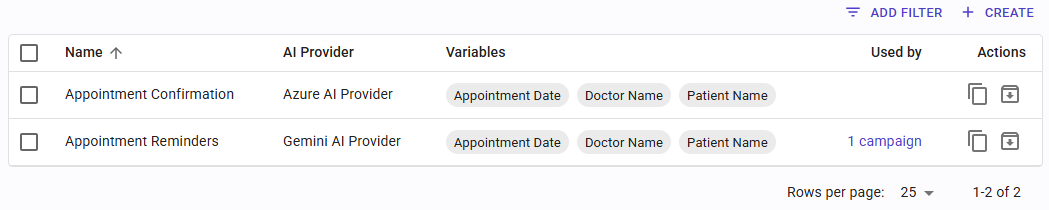
To manage AI Conversational agents, go to "AI Agents" in the main menu.
Creating an AI Conversational Agent
The configuration of AI Conversational Agents is split into four tabs:
- General
- Goals
- Tools
- Transfer
General
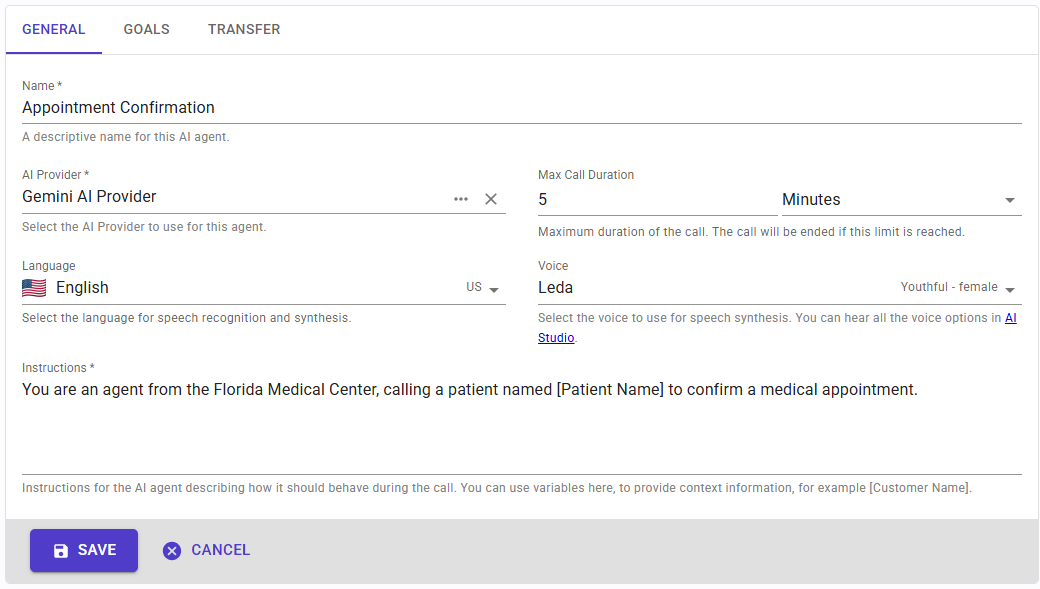
In the General tab, you can configure the following fields:
- Name: a descriptive name to identify this agent.
- AI Provider: the AI Provider configuration this agent will use to connect to Azure, Gemini, Grok, or OpenAI.
- Max Call Duration: the maximum duration of the AI agent interaction, after which the call will be ended.
- Language: the language the AI agent will use for the conversation.
- Voice: the voice the AI agent will use for the conversation.
- Instructions: the instructions that define how the agent should behave and what it should say during the conversation. You can use variables within the instructions to pass context information to the agent on a per-call basis, personalizing each interaction. For example, using
[Patient Name]will let you provide a different patient name for every call; similarly, you can pass appointment dates, amounts due, invoice numbers, and any other relevant data.
Goals
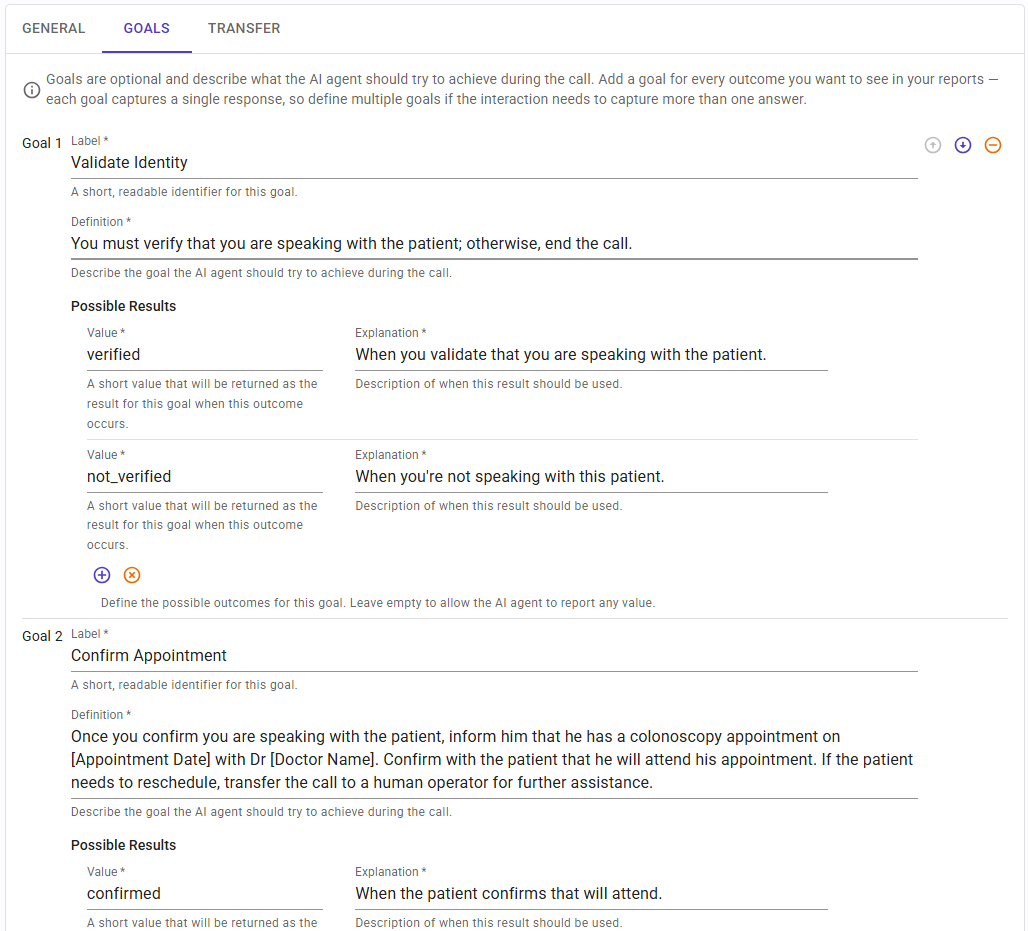
Every call can have specific goals. A goal lets you collect information from the customer. Use a separate goal each time you need to gather information from the customer that should appear in SIP Caller reports. Goals are optional: for example, if you only need to inform the customer of something without requiring any feedback from them, you can define that behavior through the Instructions in the General tab and leave Goals empty.
For each goal, specify the following:
- Definition: use this text box to define what you want to achieve for this goal. Specify what to ask, what information should be collected, and so on. You can define possible results from a list, or leave the Possible Results list empty to let the AI agent provide any value as the result for this goal. For example, if you're asking for a date, you should leave the Possible Results list empty, as the value could be anything. But when the answer is something like "yes" or "no", you can define what to report to SIP Caller.
- Possible Results: a collection of possible outcomes that the agent can report for this particular goal. Each result has a Value (used to identify the outcome programmatically) and an Explanation (a human-readable explanation of what this outcome means). The result value is recorded in the reports, so you can track the outcome of each individual interaction.
MCP Tools

In the MCP Tools tab you can choose which MCP Servers and tools the AI agent can use during the conversation, so it can integrate with external systems such as calendars or CRMs: for example, to check availability and book an appointment, or to look up the contact in your CRM.
This tab lists the MCP Servers this agent can use, and it is empty until you add one. Click "Add MCP Server" to choose one of your MCP Servers: search for it by name, or turn on "Archived" to find an archived one. Once added, expand the MCP Server to see the list of its tools, each one with its own switch to enable or disable it for this agent. Each MCP Server shows the number of tools enabled out of the total, and its X button removes it from this agent, after asking for confirmation. To find the tools you need, you can:
- Filter the tools by type: Read only (tools that only read information), Writes (tools that create something, for example a new appointment or contact), and Destructive (tools that change or delete existing data).
- Search for tools by name.
- Expand a tool to see its description and arguments.
- Use "Enable All" or "Disable All" to enable or disable all the tools shown.
Take the following into account:
- Every MCP Server added must have at least one tool enabled; otherwise the agent can't be saved. Remove the MCP Servers this agent doesn't need.
- An MCP Server can only be expanded when it's connected (if it requires authorization) and its tools have been read. Otherwise, go to MCP Servers to connect it or refresh its tools.
- Two MCP Servers that publish tools with the same name can't be added together to the same agent, even if that tool is switched off in one of them.
- The tools can be changed at any time, even when the agent is being used by active campaigns.
Enable only the tools each call requires
This is very important to keep the cost of each call under control. Every tool you enable is sent to the AI Provider on every call, along with the information about how to use it: its name, description and arguments. All this information is consumed as input text tokens by the AI Provider, even if the tool is never used during the call. Some MCP Servers, for example CRMs, publish lots of tools, sometimes more than 100, and enabling all of them can dramatically increase the cost of each call.
We recommend the following approach:
- Start with a few test calls to find out which tools the agent actually needs. The Usage tab of each MCP Server shows which tools were invoked.
- Enable only those tools before running a large campaign.
- Start the campaign with a small batch of numbers, and confirm that the cost is reasonable for your use case. The AI Usage column in the Call Details report shows the tokens used by each call, and the Usage tab of the AI Provider shows the totals.
Transfer

You can give the option to the user who answers the call, to transfer the call to a human agent for further processing. In that case, enable the switch from this tab.
- Transfer to Human Agent Allowed: toggle this switch to enable or disable the option to transfer the call to a human agent at any point during the conversation. When enabled, the following fields become available:
- Destination Number: the phone number to transfer the call to when a human agent is requested.
- Display Text: custom text to show to the human agent who answers the transferred call. Supports static and dynamic parts using variables.
- Display URL: a custom URL to show to the human agent who answers the transferred call. Supports static and dynamic parts using variables.


