
Introduction
The SIP Caller REST API lets your own applications work with your SIP Caller account, the same way you do from the Web Console. Use it to connect SIP Caller with your CRM, ERP, helpdesk or any in-house system, and automate your outbound calling operations end to end.
With the API you can:
- Manage campaigns: create, edit, duplicate and delete campaigns, and start, pause or cancel them.
- Feed campaigns with numbers: add numbers one by one or in bulk, with the variable values your call flows and AI agents use to personalize each call, or copy them from a contact list.
- Keep your lists in sync: maintain black lists and contact lists from the systems where that data lives.
- Read results: get the details of every call and every number of a campaign, to update your own records with the outcome.
The API is complemented by webhooks, which notify your systems in real time when something happens in SIP Caller, such as a campaign being activated or a call ending. Together, they let you build integrations where campaigns are created, fed and monitored without manual work.
The REST API and webhooks are available in SIP Caller Enterprise plans. See Pricing to compare the plans and their features.
Base URL
All the endpoints described in this reference are available at the following base URL:
https://api.sipcaller.com/v1The API is served over HTTPS only. The version (v1) is part of the URL, and any backward-incompatible change will be released under a new version, so your integration keeps working as-is.
Requests and responses
The API follows REST conventions:
- Resources are identified by URLs, and actions are expressed with standard HTTP methods:
GETto read,POSTto create,PUTto update andDELETEto delete. - Request and response bodies are JSON, encoded as UTF-8. Send the
Content-Type: application/jsonheader with every request that has a JSON body. - Successful requests return a
2xxstatus code. Errors return a4xxor5xxstatus code, with a JSON body describing the problem, as explained in Errors. - Identifiers are UUIDs (for example
01a0dedd-b9a2-729d-8e0a-4e3ad9197aea), except for the numbers of campaigns, black lists and contact lists, which are identified by integers. - Dates use the
YYYY-MM-DDformat, and timestamps use the ISO 8601 format without timezone (for example2026-09-26T17:57:48.064).
Account ID
Every endpoint is scoped to your SIP Caller account, whose ID is part of the URL:
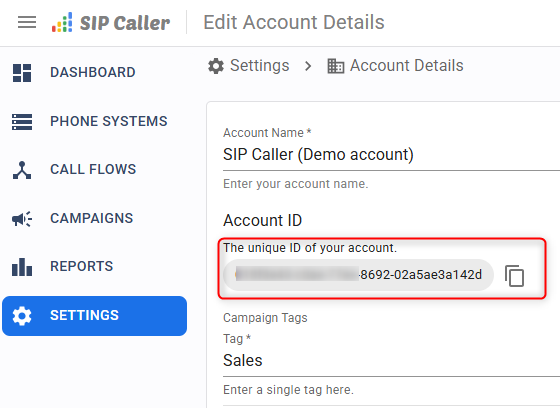
https://api.sipcaller.com/v1/accounts/ACCOUNT_ID/campaignsYou can copy your account ID from the Web Console, as shown below.
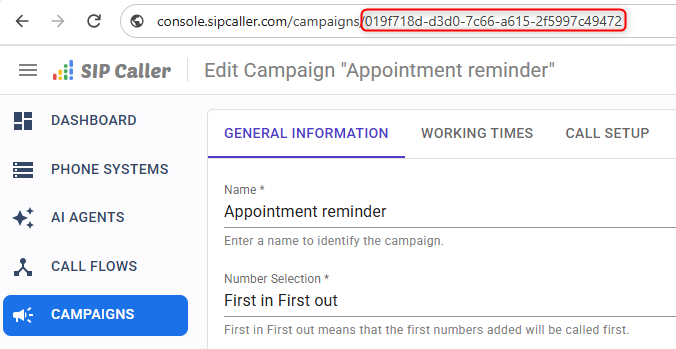
The IDs of other resources, such as campaigns, can be obtained from the API itself, or copied from the Web Console:
Getting started
- Create an API key in the Web Console, with the roles your integration needs.
- Read how to authenticate your requests.
- Try the List campaigns endpoint to check that everything works.
- Explore the reference using the menu on the left. Every endpoint includes ready-to-use examples in cURL, Python, Java, Node.js and .NET: pick your language in the code panel, and your choice will be remembered on every page.
In the examples, replace API_KEY_TOKEN, ACCOUNT_ID and the other placeholders in uppercase with your own values.


