We’re excited to announce the launch of a new dialer mode in SIP Caller: Progressive Dialer. With this addition, SIP Caller now offers three distinct dialer modes, each designed for specific use cases and customer interaction strategies: Power Dialer, Predictive Dialer, and Progressive Dialer. In this post, we’ll briefly explain each mode, their typical use cases, and how they differ from one another. To make things clearer, we’ve included visual diagrams for each mode.
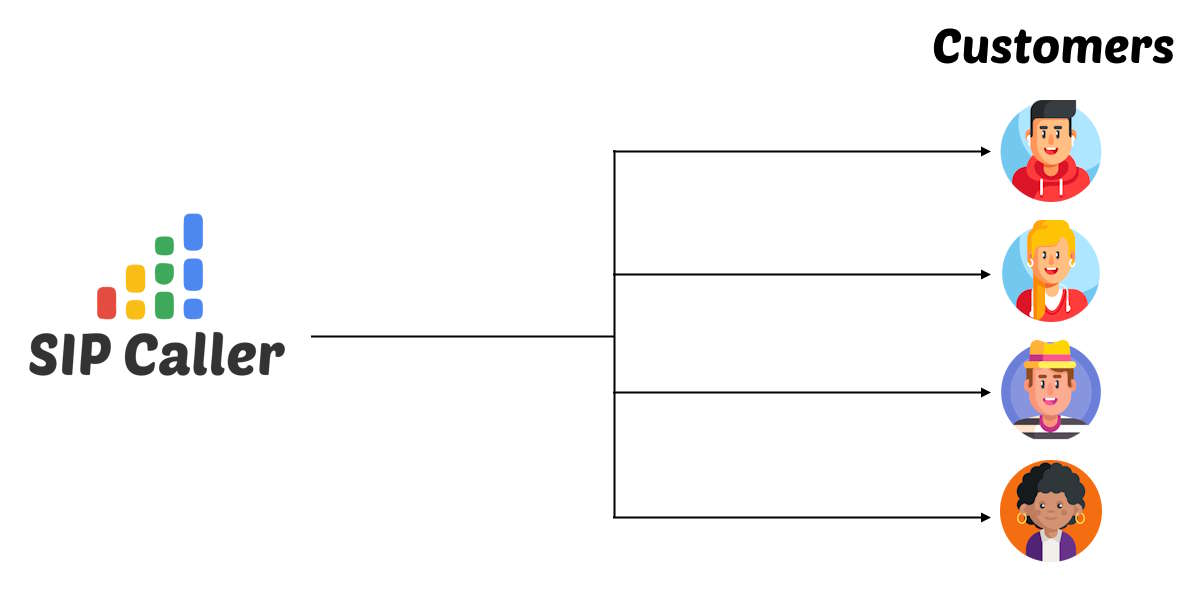
The Power Dialer is ideal for scenarios where you want to place calls at a fixed pace, whether it's for automated interactions, voice surveys, or broadcast messages. There is no dynamic pacing—calls are dialed one by one or in parallel, regardless of agent availability.
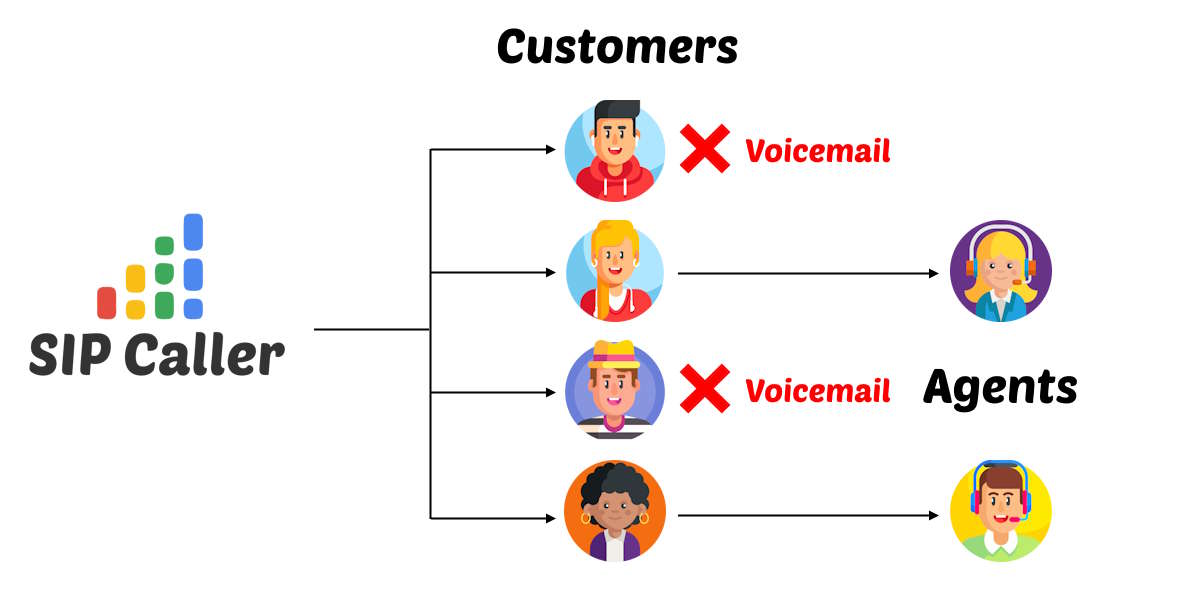
The Predictive Dialer optimizes efficiency by adjusting the dialing rate based on the number of available agents and historical answer patterns. Calls are placed in advance so that when a customer answers, an agent is already available.
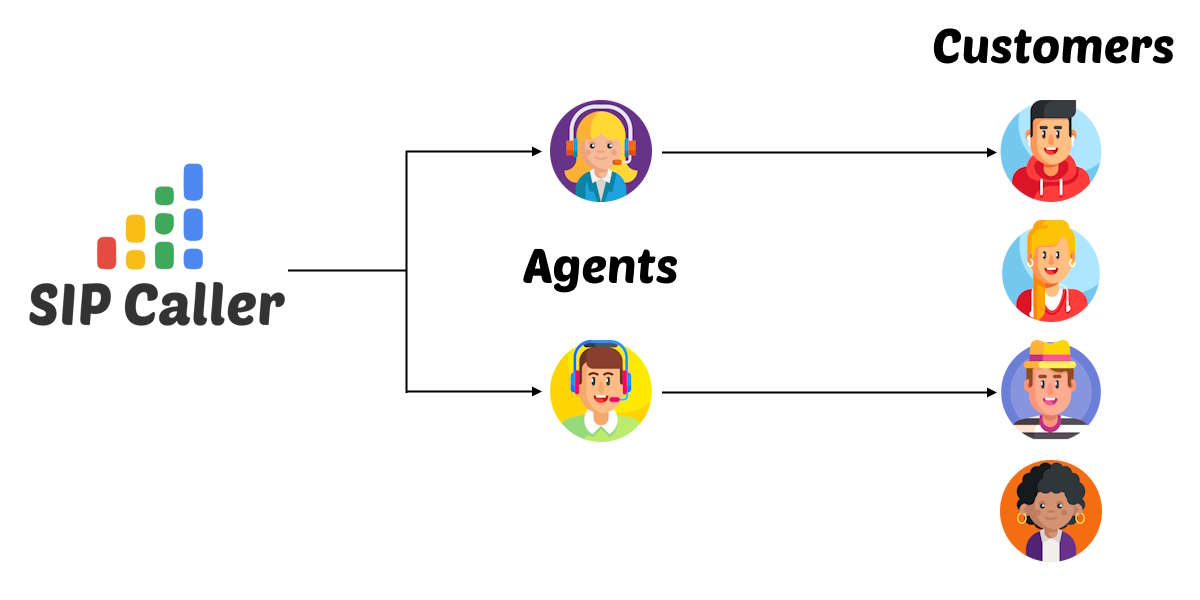
The newly introduced Progressive Dialer prioritizes customer experience by ensuring an agent is already on the line before the call is placed. This eliminates the delay between call answer and agent connection, offering a more natural conversation flow.
| Dialer Mode | Best For | Agent Required | Answering Machine Detection |
|---|---|---|---|
| Power | Surveys, reminders, announcements | ❌ No | ✅ Yes |
| Predictive | Sales, collections, productivity | ✅ Yes | ✅ Yes |
| Progressive | Service, warm calls, natural flow | ✅ Yes | ❌ No |
Each dialer mode in SIP Caller serves a different strategy. With the addition of Progressive Dialer, our platform continues to evolve to support more personalized and effective outbound communications.
Setting up a campaign in Progressive Dialer mode is easy:
Want step-by-step instructions? Check the documentation.
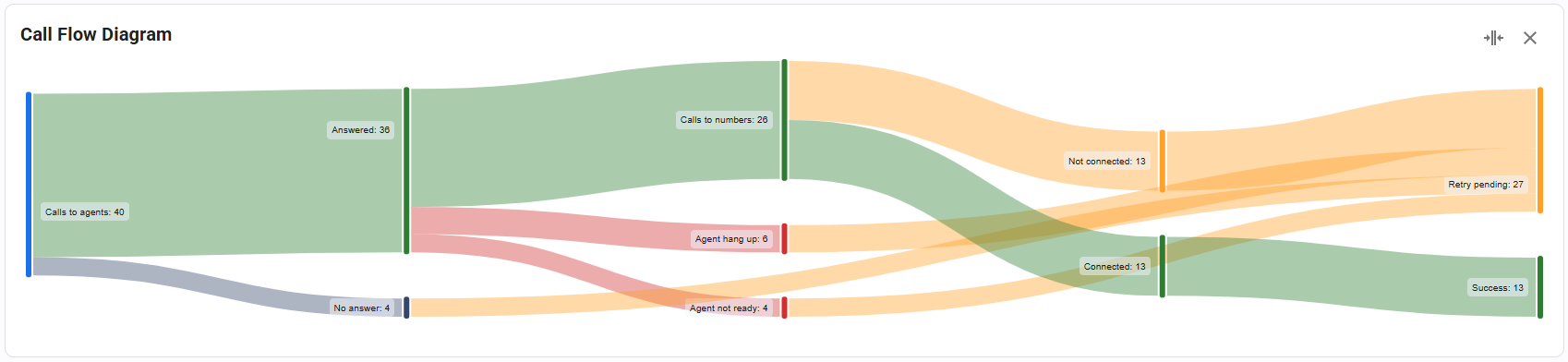
With the addition of the new Progressive Dialer, SIP Caller now gives you even more control over how you reach your customers. Whether you need high-volume agent campaigns or premium one-on-one conversations, there's a dialer mode that fits your strategy.
Have questions? Contact our team or leave us feedback—we’d love to hear how you’re using SIP Caller.

Black lists and contact lists can now be fully managed through the SIP Caller REST API. You can create, edit, and delete lists, and add or remove their numbers and variable values, directly from your own systems. A new endpoint also loads every number from a contact list into a campaign with a single request. Keep opt-outs in sync with your CRM, refresh contact lists on a schedule, and provision new accounts end-to-end without a single manual step in the console.

This release brings three meaningful improvements to SIP Caller. The list of campaigns in the Dashboard, Campaigns menu, and Reports menu now shows a detailed status icon explaining exactly why an active campaign isn't making calls. Campaigns can now also be assigned a Priority (High, Normal, or Low), so your most important campaigns get access to calling capacity first. And thanks to internal architectural improvements, campaigns now start making calls within 5 seconds of activation, down from up to 30 seconds previously.
OpenAI and Grok are now available as AI Providers in SIP Caller, joining our existing support for Microsoft Azure AI and Google Gemini AI. Both new providers can power AI Conversational Agents and AI-Based Voicemail Detection across your outbound campaigns. With four AI providers to choose from, you can align SIP Caller with the AI provider agreements your company already relies on elsewhere, or simply pick the best option available on the market for your use case.



