
Table of Contents
Overview
SIP Caller offers a REST API which allows SIP Caller customers to perform different operations on their SIP Caller account from external programs. In this way, many useful custom integrations can be developed between SIP Caller and other systems.
Obtain API_KEY_TOKEN value
In order to use the REST API, a SIP Caller customer must first create an API Key, as explained in this section, in order to obtain an API_KEY_TOKEN which will be used in the following examples for authenticating calls to the SIP Caller REST API from an external program.
Obtain ACCOUNT_ID and CAMPAIGN_ID values
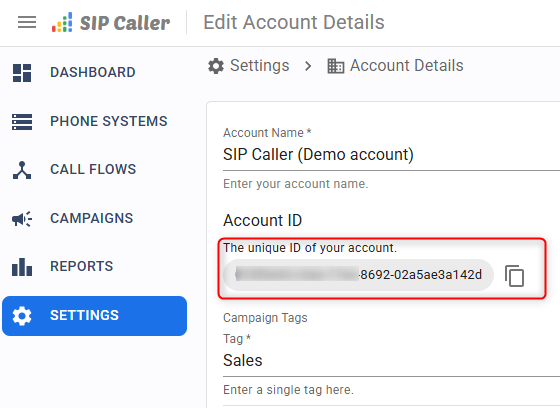
The SIP Caller customer ACCOUNT_ID value, which will be used in the following examples, can be obtained from the Web Console, as shown below:
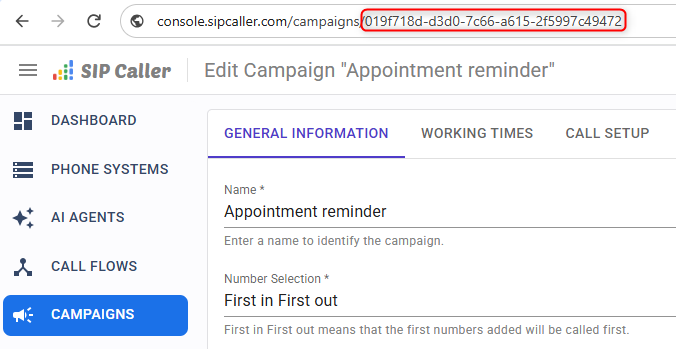
 The SIP Caller CAMPAIGN_ID value, which will be used in the following examples, can also be obtained from the Web Console, as shown below:
List campaigns
The following example shows how to list campaigns:
curl -i \
--header 'Authorization: Bearer API_KEY_TOKEN' \
--get \
--data-urlencode 'filter={"state":"Active"}' \
--data-urlencode 'sort=["name","DESC"]' \
--data-urlencode 'range=[0,99]' \
'https://api.sipcaller.com/v1/accounts/ACCOUNT_ID/campaigns'
The request allows specifying filters, sorting and range:
- The filter instruction can specify any of the following fields:
- filter={"ids":["id1","id2"]}
- filter={"name":"Campaign Name"}
- filter={"phoneSystemId":"id1"}
- filter={"extensionId":"id1"}
- filter={"dialer":{"mode":"Power"}} – Modes: Power, Predictive
- filter={"tagIds_ovl":["tag1","tag2"]}
- filter={"state":"Active"} – State: Draft, Active, Paused, Canceled, Finished
- filter={"type":"Static"} – Type: Static, Dynamic
- filter={"startDate_gte":"2024-12-01T00:00:00"} – Suffixes gte, gt, lte, lt
- filter={"endDate_gte":"2024-12-01T00:00:00"} – Suffixes gte, gt, lte, lt
- filter={"startedAt_gte":"2024-12-01T00:00:00"} – Suffixes gte, gt, lte, lt
- filter={"endedAt_gte":"2024-12-01T00:00:00"} – Suffixes gte, gt, lte, lt
- filter={"callflowIds_ctn":"id1"} – Filters by human answer or answering machine callflow
- filter={"callBehavior":{"humanAnswerCallflowId":"id1"}}
- filter={"callBehavior":{"answeringMachineCallflowId":"id1"}}
- filter={"webhookEndpointId":"id1"}
- filter={"isArchived":true}
- The sort instruction can specify any of the following fields, both ascending (ASC) or descending (DESC):
- name
- state
- type
- startDate
- endDate
- numbersCount
- startedAt
- endedAt
Create campaign
The following example shows how to create a new campaign:
curl -i \
--header 'Content-Type: application/json' \
--header 'Authorization: Bearer API_KEY_TOKEN' \
--request POST \
--data-raw '{
   "name":"My first campaign",
   "phoneSystemId":"0199817e-52e0-7079-9585-99a655c2acb3",
   "extensionId":"93e5cdfc-6e42-4995-8263-9388a9047c29",
   "tagIds":[],
   "state":"Draft",
   "isArchived":false,
   "numberProvisioning":"Dynamic",
   "numberSelection":"Fifo",
   "numberPriority":"RetryPending",
   "runningPriority":"Normal",
   "dialer":{
      "mode":"Predictive",
      "intensity":0
   },
   "callPrefix":"",
   "ringTimeout":{
      "value":30,
      "unit":"Seconds"
   },
   "maxAttempts":3,
   "retryIntervals":[
      {
         "value":1,
         "unit":"Hours"
      }
   ],
   "startDate":"2026-07-27",
   "endDate":null,
   "workingTimes":{
      "monday":[
         {
            "start":"09:00",
            "end":"18:00"
         }
      ],
      "tuesday":[
         {
            "start":"09:00",
            "end":"18:00"
         }
      ],
      "wednesday":[
         {
            "start":"09:00",
            "end":"18:00"
         }
      ],
      "thursday":[
         {
            "start":"09:00",
            "end":"18:00"
         }
      ],
      "friday":[
         {
            "start":"09:00",
            "end":"18:00"
         }
      ],
      "saturday":[
      ],
      "sunday":[
      ]
   },
   "timeZoneId":"America/Argentina/Buenos_Aires",
   "callHandling":{
      "$t":"Callflow",
      "answerTypeDetector":{
         "$t":"AmdAgent",
         "amdAgentId":"019f9cef-4a91-7c97-b7cd-edbb06a5038d",
         "unknownAnswerTreatment":"Human",
         "messageForVoicemail":{
            "$t":"OnFirstDetection",
            "callflowId":"019f81ba-a149-731a-a6cb-b47146c5f90d",
            "isCallRetryEnabled":true
         }
      },
      "callflowId":"019f9cd5-e8cd-716b-a9a6-37c9db2f97a2",
      "ttsVoiceId":"azu-en-US-AlloyTurboMultilingualNeural"
   },
   "blackListIds":[
   ],
   "webhookEndpointId":"019af0c3-62d6-70f2-84a1-5ab5671721bb"
}' \
'https://api.sipcaller.com/v1/accounts/ACCOUNT_ID/campaigns'
The request body accepts the following fields:
numberProvisioning– Possible values: Dynamic, StaticnumberSelection– Possible values: Fifo, LifonumberPriority– Possible values: RetryPending, NotContactedrunningPriority– Possible values: High, Normal, Low- Inside
ringTimeoutand each entry ofretryIntervals, theunitfield can be one of: Seconds, Minutes, Hours, Days - Inside
callHandling, the$tfield can be one of: Callflow, AiAgent - Inside
answerTypeDetector, the$tfield can be one of: Disabled, Standard, AmdAgent unknownAnswerTreatment– Possible values: Human, Voicemail- Inside
messageForVoicemail, the$tfield can be one of: Never, OnFirstDetection, OnLastAttempt, OnEveryAttempt
Edit campaign
The following example shows how to edit an existing campaign, identified by CAMPAIGN_ID. The request body accepts the same fields as when creating a campaign, but must also include the id field with the campaign ID:
curl -i \
--header 'Content-Type: application/json' \
--header 'Authorization: Bearer API_KEY_TOKEN' \
--request PUT \
--data-raw '{
   "id":"CAMPAIGN_ID",
   "name":"My first campaign",
   "phoneSystemId":"0199817e-52e0-7079-9585-99a655c2acb3",
   "extensionId":"93e5cdfc-6e42-4995-8263-9388a9047c29",
   "tagIds":[],
   "state":"Draft",
   "isArchived":false,
   "numberProvisioning":"Dynamic",
   "numberSelection":"Fifo",
   "numberPriority":"RetryPending",
   "runningPriority":"Normal",
   "dialer":{
      "mode":"Predictive",
      "intensity":0
   },
   "callPrefix":"",
   "ringTimeout":{
      "value":30,
      "unit":"Seconds"
   },
   "maxAttempts":3,
   "retryIntervals":[
      {
         "value":1,
         "unit":"Hours"
      }
   ],
   "startDate":"2026-07-27",
   "endDate":null,
   "workingTimes":{
      "monday":[
         {
            "start":"09:00",
            "end":"18:00"
         }
      ],
      "tuesday":[
         {
            "start":"09:00",
            "end":"18:00"
         }
      ],
      "wednesday":[
         {
            "start":"09:00",
            "end":"18:00"
         }
      ],
      "thursday":[
         {
            "start":"09:00",
            "end":"18:00"
         }
      ],
      "friday":[
         {
            "start":"09:00",
            "end":"18:00"
         }
      ],
      "saturday":[
      ],
      "sunday":[
      ]
   },
   "timeZoneId":"America/Argentina/Buenos_Aires",
   "callHandling":{
      "$t":"Callflow",
      "answerTypeDetector":{
         "$t":"AmdAgent",
         "amdAgentId":"019f9cef-4a91-7c97-b7cd-edbb06a5038d",
         "unknownAnswerTreatment":"Human",
         "messageForVoicemail":{
            "$t":"OnFirstDetection",
            "callflowId":"019f81ba-a149-731a-a6cb-b47146c5f90d",
            "isCallRetryEnabled":true
         }
      },
      "callflowId":"019f9cd5-e8cd-716b-a9a6-37c9db2f97a2",
      "ttsVoiceId":"azu-en-US-AlloyTurboMultilingualNeural"
   },
   "blackListIds":[
   ],
   "webhookEndpointId":"019af0c3-62d6-70f2-84a1-5ab5671721bb",
   "lastUpdatedAt":"2026-07-27T12:18:08.149"
}' \
'https://api.sipcaller.com/v1/accounts/ACCOUNT_ID/campaigns/CAMPAIGN_ID'
The lastUpdatedAt field must contain the updatedAt value returned the last time the campaign was retrieved, created or edited.
Duplicate campaign
The following example shows how to duplicate a campaign which already exists:
curl -i \
--header 'Authorization: Bearer API_KEY_TOKEN' \
--request POST \
'https://api.sipcaller.com/v1/accounts/ACCOUNT_ID/campaigns/CAMPAIGN_ID/duplicate?includeNumbers=true&newCampaignName=NewCampaignName&numbersFilter={"status":["NotContacted","Failure"]}'
The newCampaignName query-string parameter is optional, and if not provided, the new campaign will be named as the original campaign with an incremental number as suffix. The includeNumbers query-string parameter is also optional, and if not provided, the new campaign will include all numbers. If includeNumbers is set to true, then the numbersFilter query-string parameter can be used to specify which numbers from the original campaign should be included in the new campaign. The status can include any of the following values:
- NotContacted
- Contacting
- Blacklisted
- Success
- RetryPending
- Failure
Change campaign state
The following example shows how to change the state for a campaign:
curl -i \
--header 'Authorization: Bearer API_KEY_TOKEN' \
--request PUT \
--data-raw '"Active"' \
'https://api.sipcaller.com/v1/accounts/ACCOUNT_ID/campaigns/CAMPAIGN_ID/state'
The request body must be the new state in quotation marks. Possible values are the following:
- Active
- Paused
- Canceled
For a description of each campaign state and the allowed transitions between them, see the "Managing Campaign Status" section of the Campaigns page.
Delete campaigns
You can use two different API endpoints to delete campaigns, depending on whether you want to delete one or multiple campaigns:
- To delete a single campaign, you can use the following endpoint:
curl -i \
--header 'Authorization: Bearer API_KEY_TOKEN' \
--request DELETE \
'https://api.sipcaller.com/v1/accounts/ACCOUNT_ID/campaigns/CAMPAIGN_ID'
- To delete multiple campaigns in a single request, you can use the following endpoint:
curl -i \
--header 'Authorization: Bearer API_KEY_TOKEN' \
--request DELETE \
--data-raw '["CAMPAIGN_ID_1","CAMPAIGN_ID_2"]' \
'https://api.sipcaller.com/v1/accounts/ACCOUNT_ID/campaigns'
Please note that only campaigns in the following states can be deleted:
- Draft
- Finished
- Canceled
List campaign numbers
The following example shows how to list campaign numbers:
curl -i \
--header 'Authorization: Bearer API_KEY_TOKEN' \
--get \
--data-urlencode 'filter={"number":"123456789"}' \
--data-urlencode 'sort=["number","DESC"]' \
--data-urlencode 'range=[0,19]' \
'https://api.sipcaller.com/v1/accounts/ACCOUNT_ID/campaigns/CAMPAIGN_ID/numbers'
The request allows specifying filters, sorting and range:
- The filter instruction can specify any of the following fields:
- filter={"number":"123456789"} – Partial number lookup is allowed
- filter={"status":["NotContacted","Contacting","Blacklisted","Success","RetryPending","Failure"]} – Select as many status values as you need
- filter={"attempts_gt":1} – More than X attempts
- filter={"attempts_lt":3} – Less than X attempts
- The sort instruction can specify any of the following fields, both ascending (ASC) or descending (DESC):
- number
- attempts
Adding numbers to campaigns
The REST API offers several methods to add numbers to a campaign: sending them in JSON format, with or without variable values, uploading a CSV file, or copying them from a contact list. All of these methods follow the same rules.
Which campaigns can receive new numbers:
- Draft campaigns: numbers can be added to any campaign in
Draftstate, regardless of its number provisioning (StaticorDynamic). - Active or paused campaigns: once the campaign is
ActiveorPaused, only campaigns withDynamicnumber provisioning can receive new numbers.
How duplicated numbers are handled:
- Draft campaigns: the same combination of number and variable values can't be added twice, and duplicates are skipped. The same number can be added more than once if its variable values are different, since each record is assumed to communicate something different.
- Active or paused dynamic campaigns: duplicated numbers and variable values are allowed. Dynamic campaigns are often long-running, so each new record is considered a separate call, for example to contact the same customer again.
Add numbers to a dynamic campaign
The following example shows how to add a new number to a dynamic campaign which is already active:
curl -i \
--header 'Authorization: Bearer API_KEY_TOKEN' \
--request POST \
--data-raw '[{"number": "+18005551234"},{"number": "+18005551235"}]' \
'https://api.sipcaller.com/v1/accounts/ACCOUNT_ID/campaigns/CAMPAIGN_ID/numbers'
Add numbers with variable values to a dynamic campaign
The following example shows how to add a new number to a dynamic campaign which is already active, including variable values which can be used by the campaign call flow:
curl -i \
--globoff \
--header 'Content-Type: application/json' \
--header 'Authorization: Bearer API_KEY_TOKEN' \
--request POST \
--data-raw '[{"number": "+18005551234", "varValues": ["John", "199"]},{"number": "+18005551235", "varValues": ["Jane", "449"]}]' \
'https://api.sipcaller.com/v1/accounts/ACCOUNT_ID/campaigns/CAMPAIGN_ID/numbers?varNames=["Name","Amount"]'
The query-string parameter varNames is optional, and if not provided, SIP Caller will automatically assign the variable names.
Upload CSV file with new numbers for a dynamic campaign
The following example shows how to upload a CSV (comma separated values) file with multiple numbers to a dynamic campaign that is already active.
Firstly, a CSV file must be prepared which contains the new numbers to be added to the campaign. Here is an example of a CSV file with 5 numbers and their corresponding variable values:
5550001,John,199
5550002,Mary,299
5550003,Susan,149
5550004,James,300
5550005,Walter,42
Secondly, the prepared CSV file can be uploaded to SIP Caller with the following command:
curl -i \
--header 'Authorization: Bearer API_KEY_TOKEN' \
--form "file=@campaign-numbers.csv" \
'https://api.sipcaller.com/v1/accounts/ACCOUNT_ID/campaigns/CAMPAIGN_ID/numbers/upload?firstRowIsHeader=false&varCount=2'
Add numbers from a contact list to a campaign
The following example shows how to add all the numbers of an existing contact list, identified by CONTACT_LIST_ID, to a campaign, including their variable values:
curl -i \
--header 'Content-Type: application/json' \
--header 'Authorization: Bearer API_KEY_TOKEN' \
--request POST \
--data-raw '{"contactListId":"CONTACT_LIST_ID"}' \
'https://api.sipcaller.com/v1/accounts/ACCOUNT_ID/campaigns/CAMPAIGN_ID/numbers/copyFromContactList'
Example response:
{
    "totalNumbers": 2000,
    "numbersAdded": 2000,
    "numbersSkipped": 0
}
The response contains the following fields:
totalNumbers: the total number of numbers in the contact list.numbersAdded: the number of numbers added to the campaign.numbersSkipped: the number of numbers that were not added because they were duplicated, as described in the Adding numbers to campaigns section.
Delete campaign numbers
The following example shows how to delete campaign numbers, specifying the ID returned when getting the list:
curl -i \
--header 'Content-Type: application/json' \
--header 'Authorization: Bearer API_KEY_TOKEN' \
--request DELETE \
--data-raw '[NUMBER_ID_1,NUMBER_ID_2,NUMBER_ID_3]' \
'https://api.sipcaller.com/v1/accounts/ACCOUNT_ID/campaigns/CAMPAIGN_ID/numbers'
The data sent allows specifying multiple number IDs. These IDs are NOT the numbers. You will need to list the campaign numbers first, to get the ID for each record, and then delete them.
Only numbers in the following states can be deleted:
- Not Contacted: the number has not been contacted yet.
- Retry Pending: the number has previous failed call attempts, and is scheduled for retry, this retry will be canceled.
Get campaign call details
The following example shows how to get campaign call details:
curl -i \
--header 'Authorization: Bearer API_KEY_TOKEN' \
--get \
--data-urlencode 'filter={"number":"+18005551000"}' \
--data-urlencode 'sort=["number","ASC"]' \
--data-urlencode 'range=[0,99]' \
'https://api.sipcaller.com/v1/accounts/ACCOUNT_ID/campaigns/CAMPAIGN_ID/reports/callDetails'
The request allows specifying filters, sorting and range:
- The filter instruction can specify any of the following fields:
- filter={"number":"+18005551000"}
- filter={"numberPrefix":"9"}
- filter={"attempt":1}
- filter={"startedAtLocal_gte":"2024-12-01T00:00:00"} – Suffixes gte, gt, lte, lt
- filter={"answeredAtLocal_gte":"2024-12-01T00:00:00"} – Suffixes gte, gt, lte, lt
- filter={"endedAtLocal_gte":"2024-12-01T00:00:00"} – Suffixes gte, gt, lte, lt
- filter={"ringResult":"Answer"} – Possible values: Answer, NoAnswer, Busy, CallError
- filter={"answerType":"Human"} – Possible values: Human, Machine, Unknown
- filter={"sipResponseCode":200}
- filter={"endType":"HangUp"} - Possible values: HangUp, CallflowComplete, ExecutionError
- filter={"queueId":"800"}
- filter={"outcome":"Success"} - Possible values: Success, FailureWithNoRetryLeft, FailureWithRetryPending
- The sort instruction can specify any of the following fields, both ascending (ASC) or descending (DESC):
- number
- attempt
- startedAtLocal
- answeredAtLocal
- endedAtLocal
- ringResult
- answerType
- sipResponseCode
- endType
- outcome
Get campaign number details
The following example shows how to get campaign number details:
curl -i \
--header 'Authorization: Bearer API_KEY_TOKEN' \
--get \
--data-urlencode 'filter={"number":"+18005551000"}' \
--data-urlencode 'sort=["number","ASC"]' \
--data-urlencode 'range=[0,99]' \
'https://api.sipcaller.com/v1/accounts/ACCOUNT_ID/campaigns/CAMPAIGN_ID/reports/numberDetails'
The request allows specifying filters, sorting and range:
- The filter instruction can specify any of the following fields:
- filter={"number":"+18005551000"}
- filter={"attempts_gt":1} – Suffixes gte, gt, lte, lt
- filter={"status":"RetryPending"} - Possible values: NotContacted, Contacting, Blacklisted, Success, RetryPending, Failure, Deleted
- The sort instruction can specify any of the following fields, both ascending (ASC) or descending (DESC):
- number
- attempts
List black lists
The following example shows how to list black lists:
curl -i \
--header 'Authorization: Bearer API_KEY_TOKEN' \
--get \
--data-urlencode 'filter={"name":"BL"}' \
--data-urlencode 'sort=["name","DESC"]' \
--data-urlencode 'range=[0,99]' \
'https://api.sipcaller.com/v1/accounts/ACCOUNT_ID/blackLists'
The request allows specifying filters, sorting and range:
- The filter instruction can specify the following field:
- filter={"name":"Black List Name"}
- The sort instruction can specify the following field, both ascending (ASC) or descending (DESC):
- name
Example response:
[
    {
        "id": "01a0dedd-b9a2-729d-8e0a-4e3ad9197aea",
        "name": "BL1",
        "numbersCount": 3,
        "updatedAt": "2026-09-26T17:57:48.064"
    },
    {
        "id": "01a0dad2-c0a6-7205-8d4e-a2d5f4197825",
        "name": "BL2",
        "numbersCount": 8,
        "updatedAt": "2026-09-25T23:09:37.921"
    }
]
The id field of each record is the BLACK_LIST_ID value used in the following examples.
Create black list
The following example shows how to create a new black list:
curl -i \
--header 'Content-Type: application/json' \
--header 'Authorization: Bearer API_KEY_TOKEN' \
--request POST \
--data-raw '{"name":"BL1"}' \
'https://api.sipcaller.com/v1/accounts/ACCOUNT_ID/blackLists'
Example response:
{
    "id": "01a0df0c-d237-7bff-8f26-c700f4b30b62",
    "name": "BL1",
    "numbersCount": 0,
    "updatedAt": "2026-09-26T18:49:14.548"
}
Edit black list
The following example shows how to edit an existing black list, identified by BLACK_LIST_ID:
curl -i \
--header 'Content-Type: application/json' \
--header 'Authorization: Bearer API_KEY_TOKEN' \
--request PUT \
--data-raw '{
   "id":"BLACK_LIST_ID",
   "name":"BL1 - Updated",
   "lastUpdatedAt":"2026-09-26T18:49:14.548"
}' \
'https://api.sipcaller.com/v1/accounts/ACCOUNT_ID/blackLists/BLACK_LIST_ID'
The request body must include the id field with the black list ID, and the lastUpdatedAt field with the updatedAt value returned the last time the black list was retrieved, created or edited.
Example response:
{
    "id": "01a0df0c-d237-7bff-8f26-c700f4b30b62",
    "name": "BL1 - Updated",
    "numbersCount": 0,
    "updatedAt": "2026-09-26T18:55:14.548"
}
Delete black lists
The following example shows how to delete one or multiple black lists in a single request:
curl -i \
--header 'Content-Type: application/json' \
--header 'Authorization: Bearer API_KEY_TOKEN' \
--request DELETE \
--data-raw '["BLACK_LIST_ID_1","BLACK_LIST_ID_2"]' \
'https://api.sipcaller.com/v1/accounts/ACCOUNT_ID/blackLists'
The response contains the IDs of the deleted black lists:
["BLACK_LIST_ID_1","BLACK_LIST_ID_2"]
List black list numbers
The following example shows how to list the numbers of a black list:
curl -i \
--header 'Authorization: Bearer API_KEY_TOKEN' \
--get \
--data-urlencode 'filter={"number":"115555"}' \
--data-urlencode 'sort=["number","DESC"]' \
--data-urlencode 'range=[0,19]' \
'https://api.sipcaller.com/v1/accounts/ACCOUNT_ID/blackLists/BLACK_LIST_ID/numbers'
The request allows specifying filters, sorting and range:
- The filter instruction can specify the following field:
- filter={"number":"115555"} – Partial number lookup is allowed
- The sort instruction can specify the following field, both ascending (ASC) or descending (DESC):
- number
Example response:
[
    {
        "id": 3,
        "number": "1155550003",
        "description": "Do not call"
    },
    {
        "id": 2,
        "number": "1155550002",
        "description": "Do not call"
    },
    {
        "id": 1,
        "number": "1155550001",
        "description": "Do not call"
    }
]
Add numbers to a black list
The following example shows how to add new numbers to a black list, with an optional description for each number:
curl -i \
--header 'Content-Type: application/json' \
--header 'Authorization: Bearer API_KEY_TOKEN' \
--request POST \
--data-raw '[{"number":"+18005551234","description":"Does not want to be called"}]' \
'https://api.sipcaller.com/v1/accounts/ACCOUNT_ID/blackLists/BLACK_LIST_ID/numbers'
Example response:
[
    {
        "id": 21,
        "number": "+18005551234",
        "description": "Does not want to be called"
    }
]
Delete black list numbers
The following example shows how to delete black list numbers, specifying the ID returned when getting the list:
curl -i \
--header 'Content-Type: application/json' \
--header 'Authorization: Bearer API_KEY_TOKEN' \
--request DELETE \
--data-raw '[NUMBER_ID_1,NUMBER_ID_2,NUMBER_ID_3]' \
'https://api.sipcaller.com/v1/accounts/ACCOUNT_ID/blackLists/BLACK_LIST_ID/numbers'
The data sent allows specifying multiple number IDs. These IDs are NOT the numbers. You will need to list the black list numbers first, to get the ID for each record, and then delete them. The response contains the IDs of the deleted numbers:
[NUMBER_ID_1,NUMBER_ID_2,NUMBER_ID_3]
List contact lists
The following example shows how to list contact lists:
curl -i \
--header 'Authorization: Bearer API_KEY_TOKEN' \
--get \
--data-urlencode 'filter={"name":"CL1"}' \
--data-urlencode 'sort=["name","DESC"]' \
--data-urlencode 'range=[0,99]' \
'https://api.sipcaller.com/v1/accounts/ACCOUNT_ID/contactLists'
The request allows specifying filters, sorting and range:
- The filter instruction can specify the following field:
- filter={"name":"Contact List Name"}
- The sort instruction can specify the following field, both ascending (ASC) or descending (DESC):
- name
Example response:
[
    {
        "id": "019ffc4b-1c59-72ed-b15a-cbf81a2b95d9",
        "name": "CL1",
        "numbersCount": 1255,
        "varNames": [
            "Customer Name",
            "Due Balance"
        ],
        "updatedAt": "2026-08-13T18:03:28.729"
    }
]
The id field of each record is the CONTACT_LIST_ID value used in the following examples. The varNames field contains the names of the variables whose values are stored for each number of the contact list.
Create contact list
The following example shows how to create a new contact list:
curl -i \
--header 'Content-Type: application/json' \
--header 'Authorization: Bearer API_KEY_TOKEN' \
--request POST \
--data-raw '{"name":"CL1"}' \
'https://api.sipcaller.com/v1/accounts/ACCOUNT_ID/contactLists'
Example response:
{
    "id": "01a0df17-6fa4-7332-a3c1-d605df53fea2",
    "name": "CL1",
    "numbersCount": 0,
    "varNames": null,
    "updatedAt": "2026-09-26T19:00:50.21"
}
Edit contact list
The following example shows how to edit an existing contact list, identified by CONTACT_LIST_ID:
curl -i \
--header 'Content-Type: application/json' \
--header 'Authorization: Bearer API_KEY_TOKEN' \
--request PUT \
--data-raw '{
   "id":"CONTACT_LIST_ID",
   "name":"CL1 - Updated",
   "lastUpdatedAt":"2026-09-26T19:00:50.21"
}' \
'https://api.sipcaller.com/v1/accounts/ACCOUNT_ID/contactLists/CONTACT_LIST_ID'
The request body must include the id field with the contact list ID, and the lastUpdatedAt field with the updatedAt value returned the last time the contact list was retrieved, created or edited.
Example response:
{
    "id": "01a0df17-6fa4-7332-a3c1-d605df53fea2",
    "name": "CL1 - Updated",
    "numbersCount": 0,
    "varNames": null,
    "updatedAt": "2026-09-26T19:05:15.123"
}
Delete contact lists
The following example shows how to delete one or multiple contact lists in a single request:
curl -i \
--header 'Content-Type: application/json' \
--header 'Authorization: Bearer API_KEY_TOKEN' \
--request DELETE \
--data-raw '["CONTACT_LIST_ID_1","CONTACT_LIST_ID_2"]' \
'https://api.sipcaller.com/v1/accounts/ACCOUNT_ID/contactLists'
The response contains the IDs of the deleted contact lists:
["CONTACT_LIST_ID_1","CONTACT_LIST_ID_2"]
List contact list numbers
The following example shows how to list the numbers of a contact list:
curl -i \
--header 'Authorization: Bearer API_KEY_TOKEN' \
--get \
--data-urlencode 'filter={"number":"18035551"}' \
--data-urlencode 'sort=["number","DESC"]' \
--data-urlencode 'range=[0,19]' \
'https://api.sipcaller.com/v1/accounts/ACCOUNT_ID/contactLists/CONTACT_LIST_ID/numbers'
The request allows specifying filters, sorting and range:
- The filter instruction can specify the following field:
- filter={"number":"18035551"} – Partial number lookup is allowed
- The sort instruction can specify the following field, both ascending (ASC) or descending (DESC):
- number
Example response:
[
    {
        "id": 8,
        "number": "+18035551005",
        "varValues": [
            "Millie Watson",
            "$118.49"
        ]
    },
    {
        "id": 7,
        "number": "+18035551004",
        "varValues": [
            "Stefan Robertson",
            "$99.00"
        ]
    },
    {
        "id": 6,
        "number": "+18035551003",
        "varValues": [
            "Clara White",
            "$350.00"
        ]
    },
    {
        "id": 5,
        "number": "+18035551002",
        "varValues": [
            "Peter Smith",
            "$852.05"
        ]
    },
    {
        "id": 4,
        "number": "+18035551001",
        "varValues": [
            "Jane Clarke",
            "$523.26"
        ]
    }
]
The values in varValues follow the same order as the variable names in the varNames field of the contact list.
Add numbers to a contact list
The following example shows how to add new numbers to a contact list, including their variable values:
curl -i \
--header 'Content-Type: application/json' \
--header 'Authorization: Bearer API_KEY_TOKEN' \
--request POST \
--data-raw '[{"number":"+18005551239","varValues":["Peter Jackson","$367.75"]}]' \
'https://api.sipcaller.com/v1/accounts/ACCOUNT_ID/contactLists/CONTACT_LIST_ID/numbers?varNames=["Customer Name","Due Balance"]'
Example response:
[
    {
        "id": 10,
        "number": "+18005551239",
        "varValues": [
            "Peter Jackson",
            "$367.75"
        ]
    }
]
Delete contact list numbers
The following example shows how to delete contact list numbers, specifying the ID returned when getting the list:
curl -i \
--header 'Content-Type: application/json' \
--header 'Authorization: Bearer API_KEY_TOKEN' \
--request DELETE \
--data-raw '[NUMBER_ID_1,NUMBER_ID_2,NUMBER_ID_3]' \
'https://api.sipcaller.com/v1/accounts/ACCOUNT_ID/contactLists/CONTACT_LIST_ID/numbers'
The data sent allows specifying multiple number IDs. These IDs are NOT the numbers. You will need to list the contact list numbers first, to get the ID for each record, and then delete them. The response contains the IDs of the deleted numbers:
[NUMBER_ID_1,NUMBER_ID_2,NUMBER_ID_3]


