
Settings
AI Voicemail Detection
An AI Voicemail Detection Agent uses AI to identify how a call has been answered — a human, a voicemail system, or a company IVR — and to handle automated call screeners on your behalf — for example, if a screener asks the caller to press 1 to get connected, the agent can send the required DTMF digit; or if the screener asks who is calling, the agent can speak and provide the caller's name and the purpose of the call.
Once created, an AI Voicemail Detection Agent can be assigned to a campaign to control how calls are handled for Voicemail Detection. You can create as many AI Voicemail Detection Agents as you need.
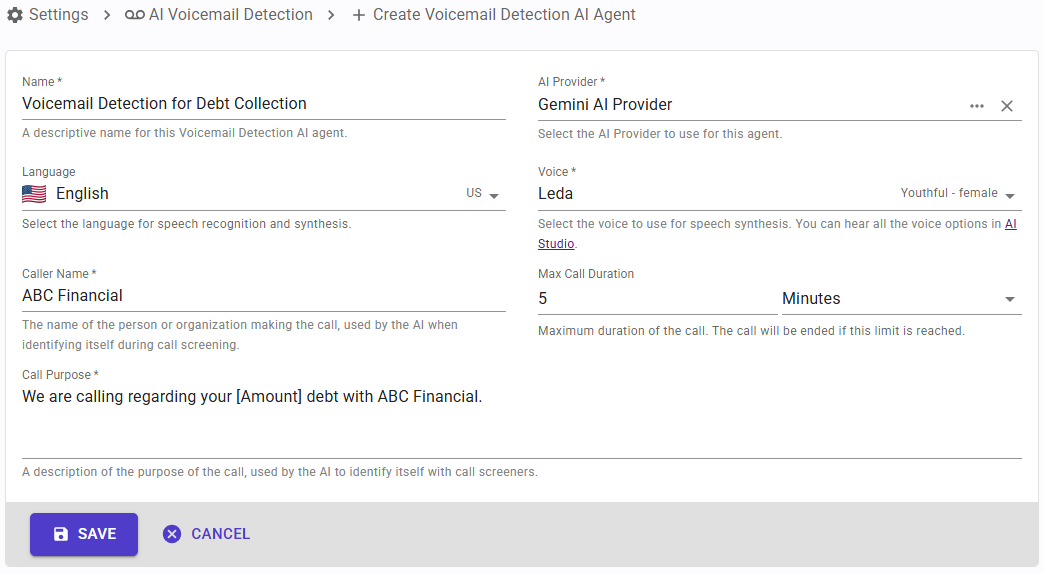
To manage AI Voicemail Detection Agents, go to "Settings" > "AI Voicemail Detection".
Creating an AI Voicemail Detection Agent
When creating an AI Voicemail Detection Agent, you can configure the following fields:
- Name: a descriptive name to identify this agent.
- AI Provider: the AI Provider configuration this agent will use to connect to Azure, Gemini, Grok, or OpenAI.
- Language: the language the AI agent will use in case it needs to interact with a call screener.
- Voice: the voice the AI agent will use in case it needs to interact with a call screener.
- Caller Name: the name of the caller that the agent will provide if a call screener asks who is calling.
- Call Purpose: the reason for the call that the agent will explain if a call screener asks.
- Max Call Duration: the maximum duration of the AI agent interaction, after which the call will be ended.
Once created, select the AI Voicemail Detection Agent in your campaign settings to use it for Voicemail Detection.


